

Welcome! Check out CBSE Class 11 Informatics Technology Open Office Calc Worksheet right here. Get free printable Class 11 Informatics Practices worksheets in PDF for Open Office Calc. Created by experienced teachers, these practice sheets match the 2026-27 exam guidelines set by CBSE, NCERT, and KVS.
Open Office Calc Practice Set for Class 11 Informatics Practices
Students should use these Class 11 Informatics Practices chapter-wise worksheets for daily practice to improve their conceptual understanding. This detailed test papers include important questions and solutions for Open Office Calc, to help you prepare for school tests and final examination. Regular practice of these Class 11 Informatics Practices questions will help improve your problem-solving speed and exam accuracy for the 2026-27 session.
Class 11 Informatics Practices Open Office Calc Printable PDF Worksheet
INFORMATION TECHNOLOGY
OPENOFFICE CALC
LAB – WORKSHEET
Write the steps to do the following:
1. Open a new spreadsheet in Open Office Calc and save it as InternetHours
The following table records the number of hours each student uses Internet in a week
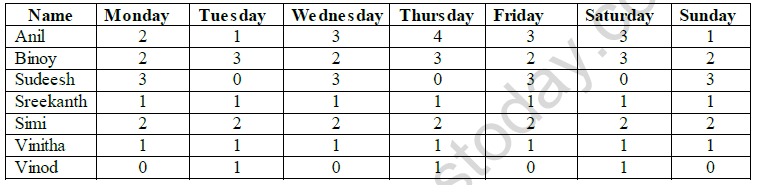
a) Type data into your spreadsheet.
b) Add another column titled “SlNo:”to the left of name column. Fill the number in SlNo column using auto fill feature.
c) Add another column titled “Total hours per user”. Using an appropriate formula, calculate the total hours each student used in the week.
d) Add another column titled “ Average hours used in a week”. Using an appropriate formula, calculate the average hours each student used in a week. The hours should be rounded to 1 decimal place.
e) Below the last student, add a row titled “Total hours per day”. Using an appropriate formula, calculate the total hours used each day of the week.
f) Add another row titled “Minimum hours used”. Using an appropriate formula, find the minimum number of hours used for each of the days.
g) Add another row titled “Maximum hours used”. Using an appropriate formula, find the maximum number of hours used for each of the days.
h) Select the cell wherever 0 is typed and put red colour for that cell
i) Count the number of students using the count() function.
j) Add a title “INTERNET USAGE” to your spreadsheet.
k) Save the spreadsheet with appropriate name.
Please click on below link to download CBSE Class 11 Informatics Technology Open Office Calc Worksheet
Free study material for Informatics Practices
Open Office Calc Practice Sheet & Solutions for Class 11 Informatics Practices
Revision Worksheet: Open Office Calc (CBSE)
Utilize the Open Office Calc practice worksheet shared above to strengthen your school test preparation. These solved Q&As align with the official CBSE framework for Class 11 Informatics Practices. Download the PDF format instantly to practice daily, featuring core exam topics curated by experienced teachers for better results.
Master Open Office Calc with Official NCERT Resources
Built strictly from the official NCERT book for Class 11 Informatics Practices, this practice content offers reliable academic support. Following your self-practice, our educators recommend reviewing our detailed NCERT solutions to learn optimal problem-solving approaches for Informatics Practices. All study aids are completely free to access.
Boost Your Exam Confidence in Class 11 Informatics Practices
To excel in Class 11, students should test their skills using the online Informatics Practices MCQ test. Additional printable assignments for Class 11 Informatics Practices are readily accessible on our site. Staying consistent with practice creates deep confidence and boosts scores across CBSE tests.
FAQs
You can download the teacher-verified PDF for CBSE Class 11 Informatics Technology Open Office Calc Worksheet from StudiesToday.com. These practice sheets for Class 11 Informatics Practices are designed as per the latest CBSE academic session.
Yes, our CBSE Class 11 Informatics Technology Open Office Calc Worksheet includes a variety of questions like Case-based studies, Assertion-Reasoning, and MCQs as per the 50% competency-based weightage in the latest curriculum for Class 11.
Yes, we have provided detailed solutions for CBSE Class 11 Informatics Technology Open Office Calc Worksheet to help Class 11 and follow the official CBSE marking scheme.
Daily practice with these Informatics Practices worksheets helps in identifying understanding gaps. It also improves question solving speed and ensures that Class 11 students get more marks in CBSE exams.
All our Class 11 Informatics Practices practice test papers and worksheets are available for free download in mobile-friendly PDF format. You can access CBSE Class 11 Informatics Technology Open Office Calc Worksheet without any registration.